
I joined Optum as a TDP intern during the Summer of 2026, as part of a team with three other interns. Over the next 10 weeks, we would join a broader team and be tasked with a problem in automation, where we would be responsible for the end-to-end design and development of a solution.
Our first two weeks of the internship revolved primarily around communicating with stakeholders to understand in-depth the problem at hand, and using insights from them to brainstorm plausible solutions.
From these meetings, we learned about the logistics behind the old 835 remediation process. An 835 file contains remittance advice to reconcile claims in order for the healthcare providers to post. In particular, the stakeholders explained that there are two teams involved in the old process: the engineers/”835 team”, who traditionally are business analysts, and the EDI team. Below is the flow for the original 835 remediation process:

On average, the EDI team receives roughly 560 835s per week. Of those, about 30 fail. The amount of time it takes to fix just one 835 can vary significantly depending on the complexity of the error, ranging anywhere between 3 and 20 minutes, without consideration of the wait time for emails. Despite a 5% fail rate, this translates to many hours each week spent dedicated just to finding and suggesting errors for 835s.
The time demand for this current process is critical because major delays in remediating 835 files mean the corresponding payment claims do not get reconciled by the healthcare provider and posted efficiently. With an automated, centralized platform, engineers not only will save hours each week from finding and sending remediations, but healthcare payments can be made much sooner.

One of the biggest takeaways that I got out of meeting with stakeholders was the need for a centralized platform where users can see everything and work efficiently. With these insights, and after brainstorming, I came up with an idea involving an AI-powered web application, where the AI would find suggestions, dependent on the type of error the 835 contains. The web application would include a way for users to view all erroneous 835s and their individual contents, contain a visually intuitive way to handle AI suggestions, and a history of how previous 835s have been handled.
1
How can users easily access different erroneous 835 files?
2
How do you make AI suggestions readable, while also giving them the option to approve or deny each one?
3
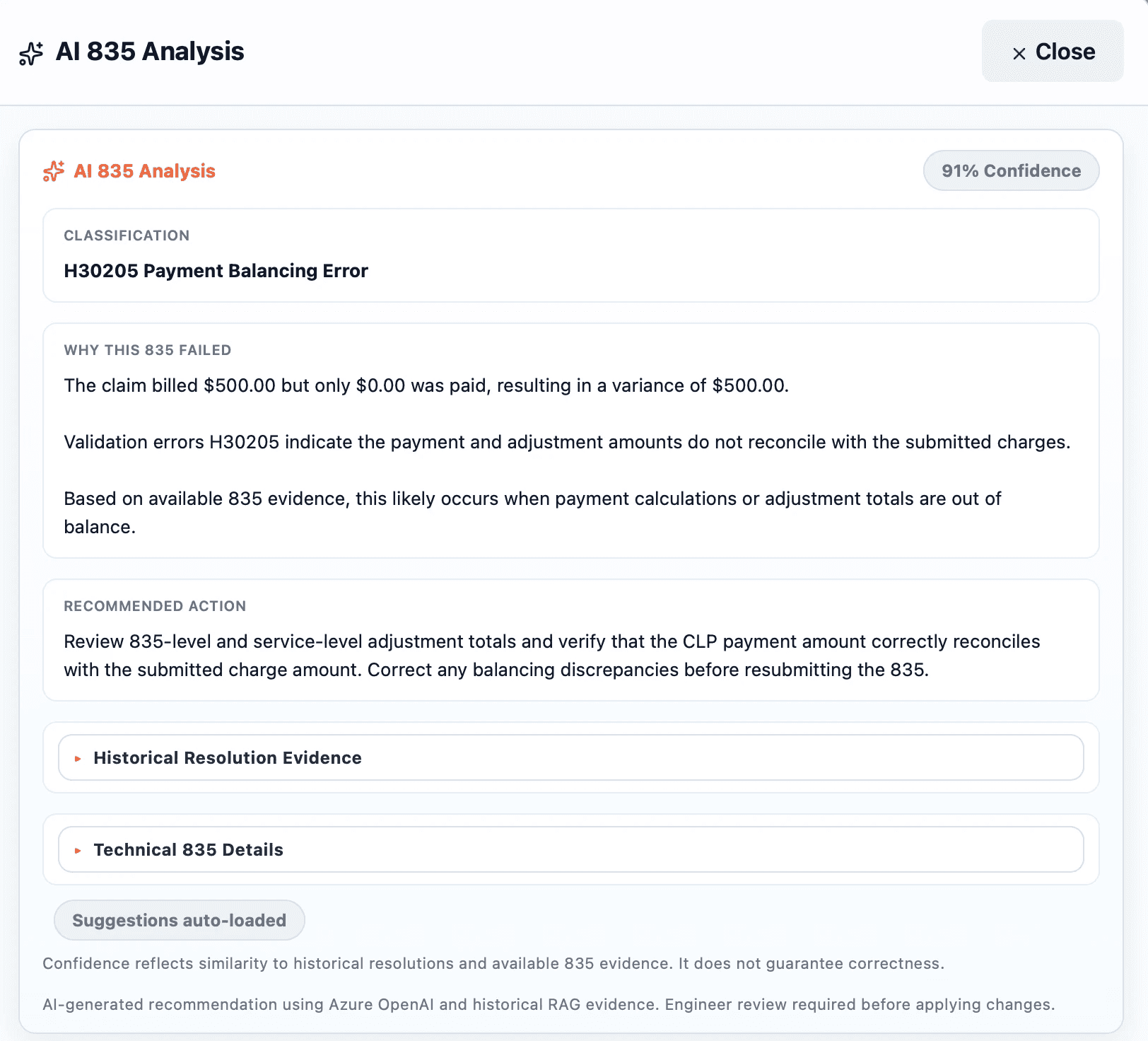
How do we clearly show the AI’s justification behind suggestions?
Provided these notes, I sketched, designed, and implemented a three-paged platform for ClaimStream: one page for user authentication, another for the dashboard, metrics, and tracking, and the editor view.

For the editor, I designed and implemented a two-panel UI where AI suggestions are displayed through an inline-diff system, taking inspiration from how Visual Studio Code/Cursor visually handles Git conflict resolutions. The queue on the leftmost side of the screen lists all of the erroneous 835s that have been ingested into ClaimStream. The left panel serves as the file editor + the place where AI suggestions render as a diff and users have options to approve or deny each suggestion within the editor itself. The right panel would display what the resulting file would look like after users approve suggestions, so that they get a clearer view of the 835 without the diff display.
It’s important to note: not all suggestions will get displayed per 835. The only times suggestions will display in the editor are if the model’s confidence for the corresponding suggestions exceeds 90%. This way, users save an extra step in denying suggestions the model is not confident with, and prevent hallucinated suggestions from appearing in the first place.
Before vs. After Applying Suggestions
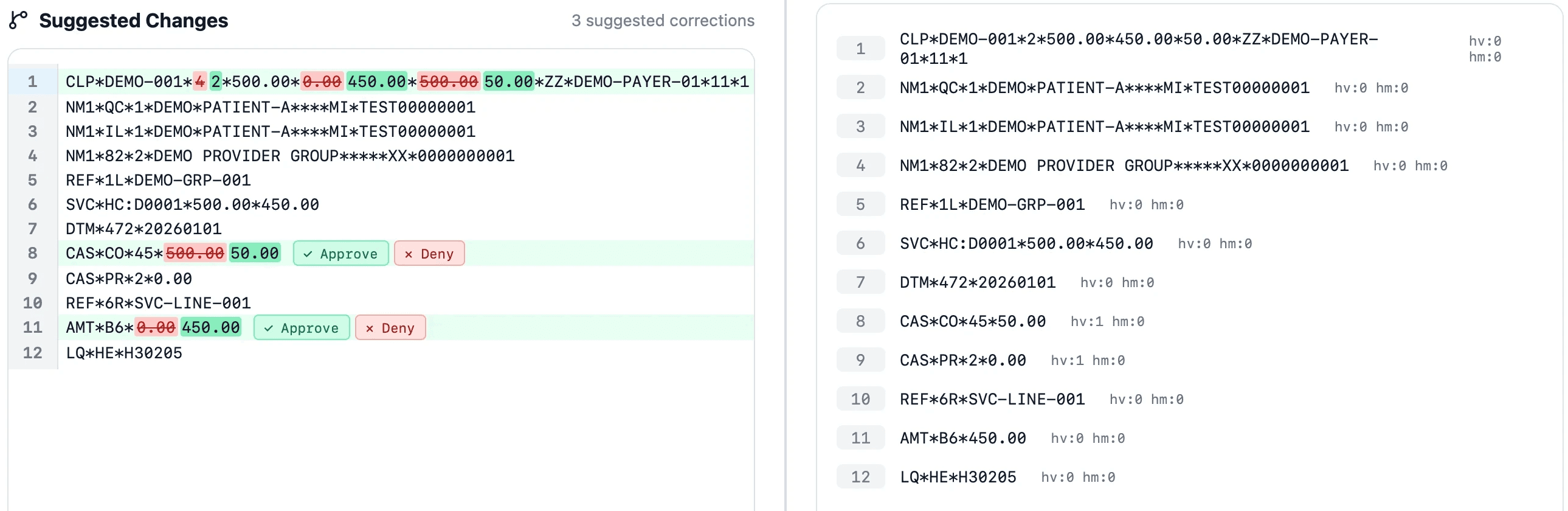

For each AI suggestion that is rendered in the 835 editor panel, there are two immediate options for the user: one to approve, and the other to deny. If the user approves, the suggestion gets applied and overrides the original line, which is then reflected in the resulting panel (see line 8 in both panels, for example).
However, if users choose to deny, the suggestion gets dismissed, and the user has the option to provide a reason as to why they denied the fix. The model will then use this feedback to enhance its suggestive capabilities, with the goal of gaining a better understanding of 835 remediations and providing smarter suggestions with high confidence.

AI Insights
Outcome
By the end of the 10-week internship, we deployed this platform through Kubernetes and handed it off to the 835 team. Before, the EDI and 835 team would communicate back and forth in finding, suggesting, and applying remediations. Now, with ClaimStream, everything needed for the 835 team for fixing these files is all in one platform, not only eliminating the need for unnecessary communication with the EDI team, but also providing a reliable way to track current and previously reprocessed 835s. In addition, ClaimStream's dashboard also provides weekly metrics showing how many 835s have been processed in a weekly timeline, allowing users to easily see how claims have been processed on a week-by-week basis and change their process as they see fit.